
![👮 JamzPortSecurity – Port Security Job [QB-Core | ESX I QBox]](https://dunb17ur4ymx4.cloudfront.net/packages/images/8694ffb9a85fd01db25bbda4da9f4d398e73c419.gif)
Jamz Port Security is a next-gen port security checkpoint system for QB-Core & ESX servers. 🚛 Bring true high-stakes security roleplay to your city with realistic driver inspections, professional document verification, cargo manifest handling, and a sleek MDT interface built for immersive port security operations ⚡
Officers conduct thorough inspections of commercial drivers entering the port, verifying identities, checking cargo manifests, and documenting all interactions through a comprehensive reporting system. 💼 This creates a fully authentic security checkpoint experience designed for serious RP servers that want real-risk, real-reward port security operations.
🔗 YouTube Preview: JamzScripts
━━━━━━━━━━━━━━━━━━━━━━━━━━━━━━━━━━━━━━━
━━━━━━━━━━━━━━━━━━━━━━━━━━━━━━━━━━━━━━━
✨ FEATURES

🎯 COMPLETE DRIVER INSPECTION WORKFLOW
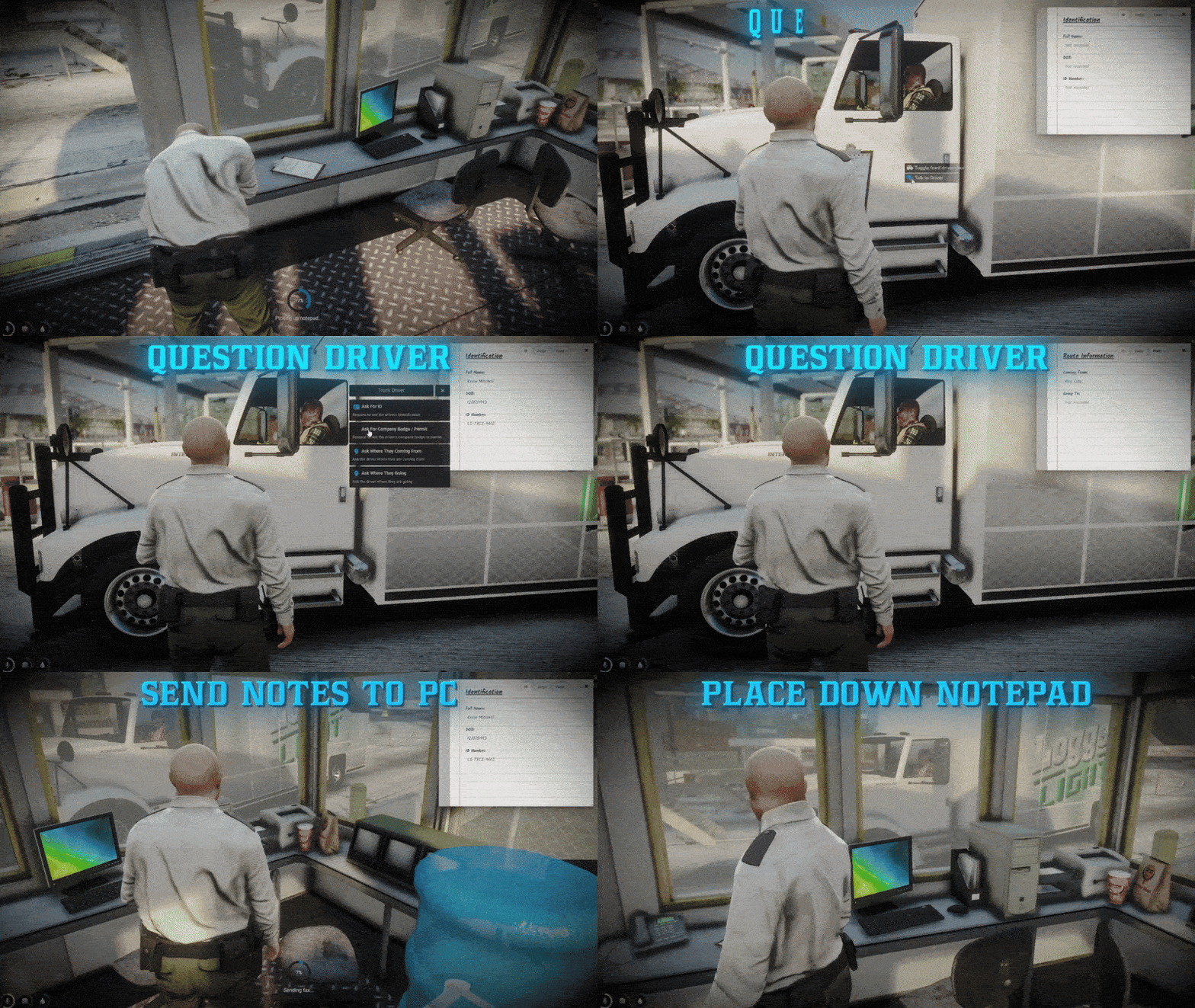
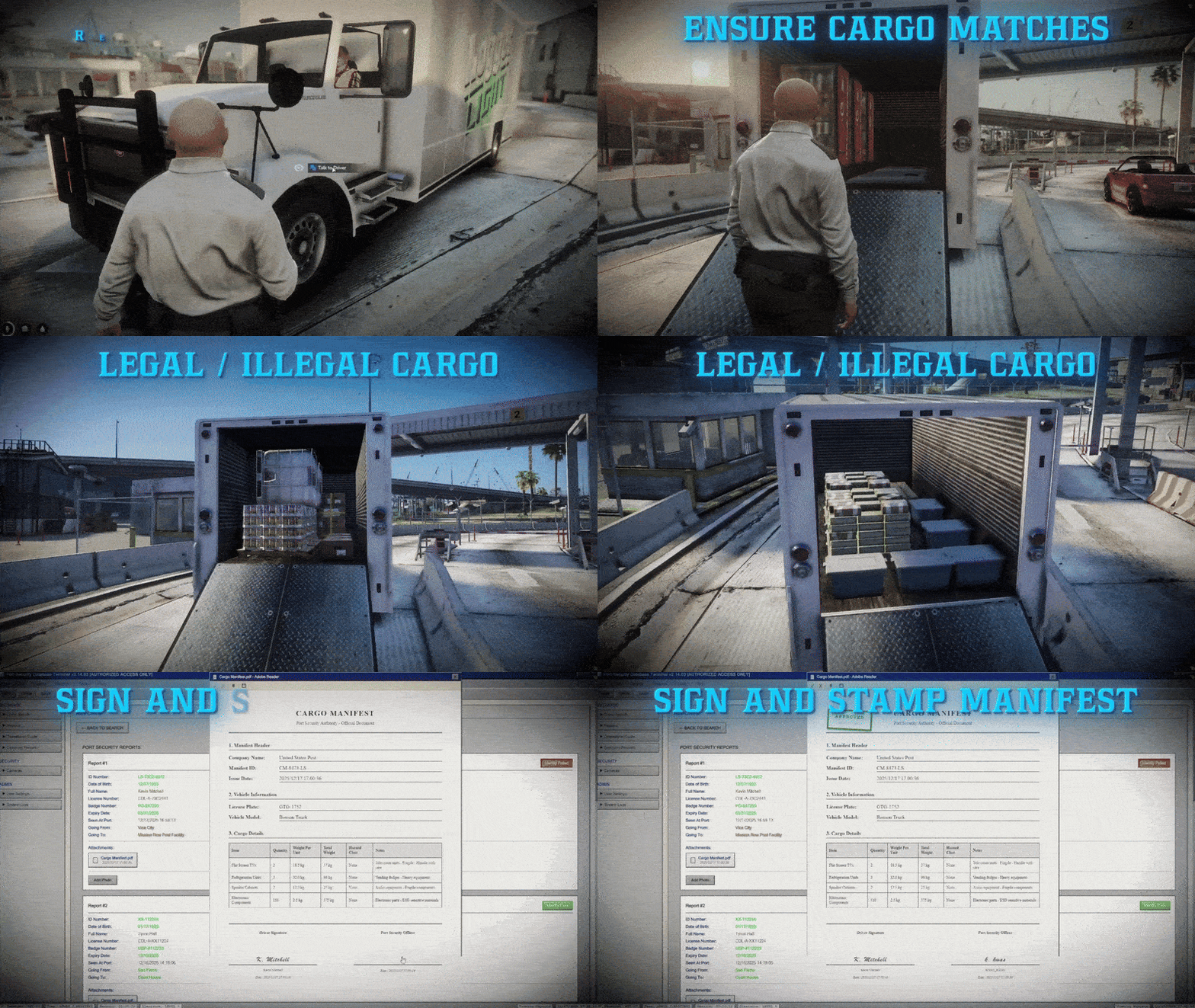
Conduct professional driver inspections with a comprehensive 8-step workflow. Officers interact with drivers, record information in notepads, process documents through fax machines, verify driver records in the MDT system, inspect cargo manifests, and make approval/decline decisions. Every step is designed for immersive roleplay with realistic interactions and consequences.
From initial contact to final decision - complete security operations.
All Inspection Data Saved to Database
📋 ADVANCED MDT SYSTEM
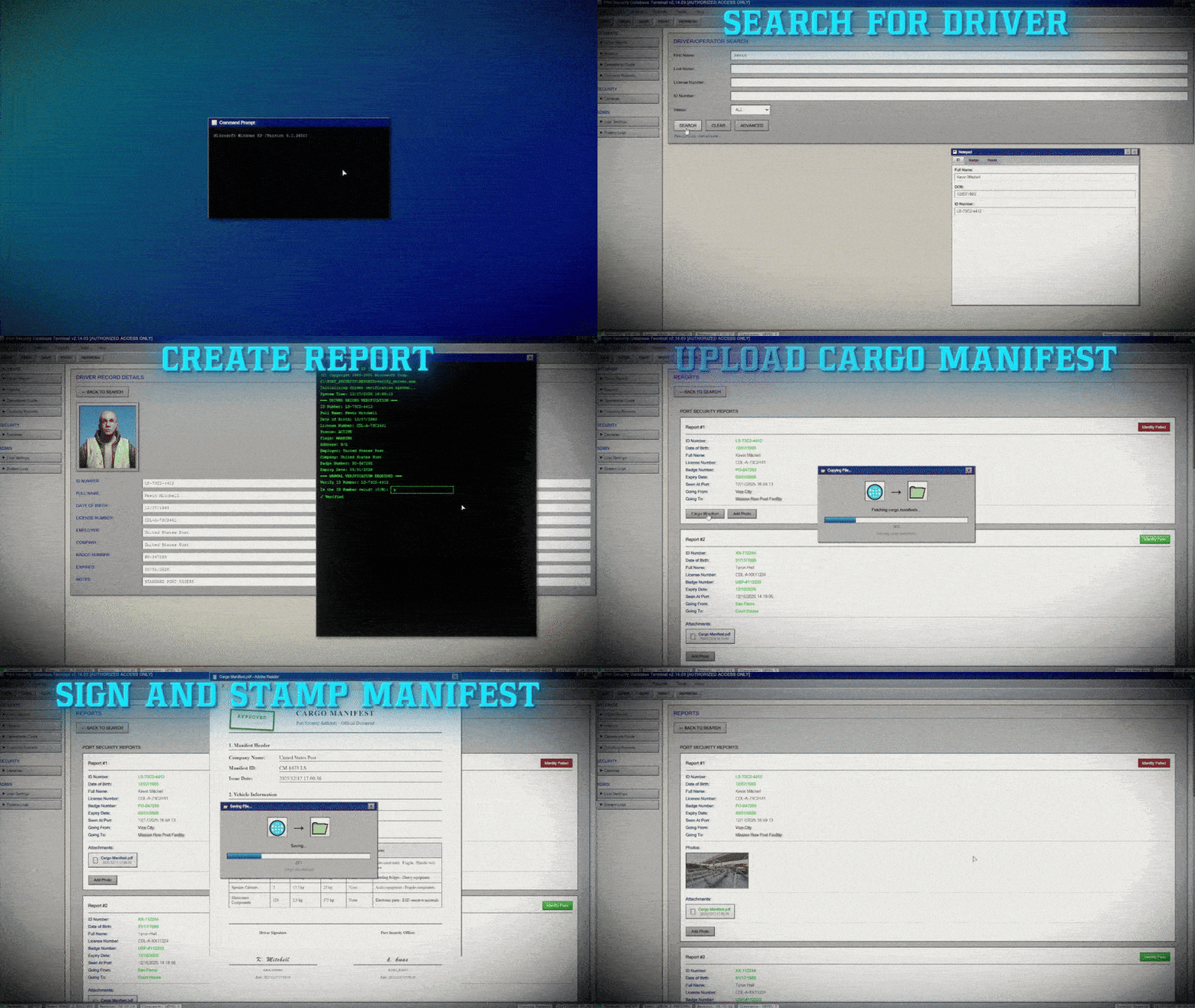
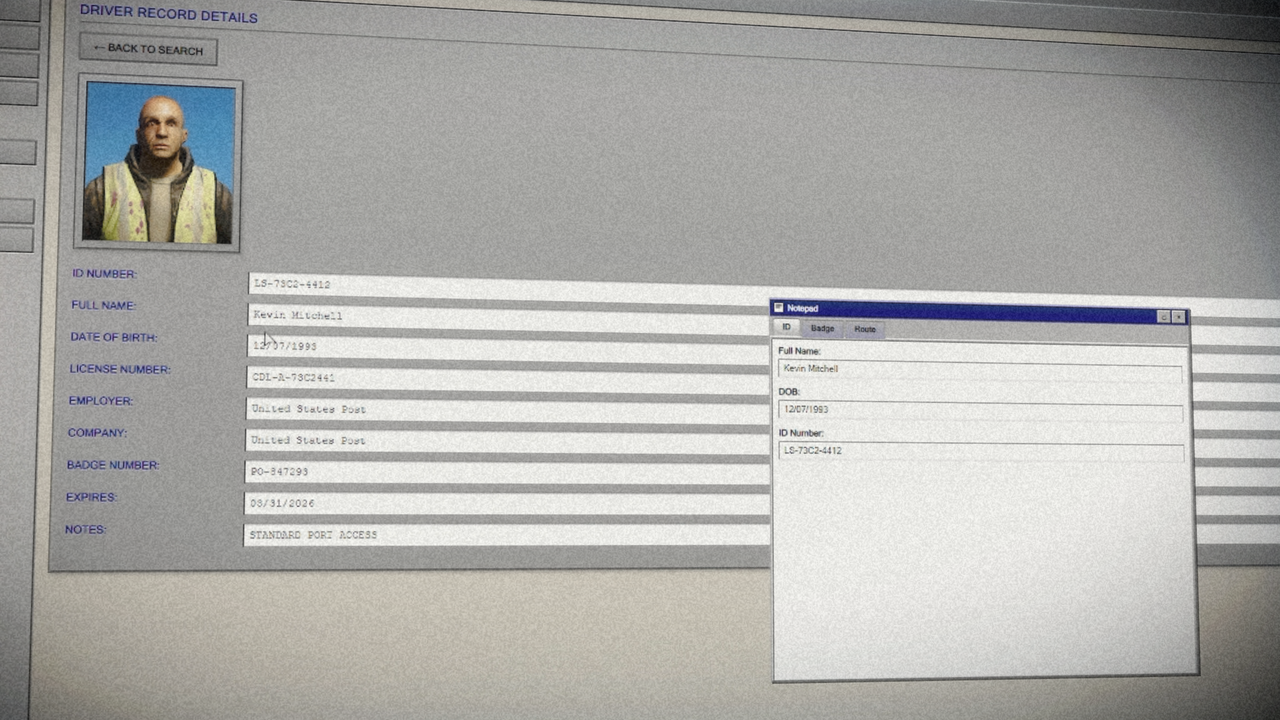
Access a professional Mobile Data Terminal interface with driver search functionality, detailed record viewing, company records management, and comprehensive reporting tools. Features include real-time driver database queries, photo management, cargo manifest uploads, and complete inspection report generation with verification tracking.
Professional law enforcement-grade interface for serious RP.
All Driver Records Stored in Configurable Database
📝 NOTEPAD & DOCUMENT PROCESSING
Record driver information using a physical notepad system with three tabs (Identification, Company, Route). Fax completed notepads to the computer system for digital processing. Features include persistent data storage, smooth animations, and seamless integration with the MDT system for document review and verification.
Realistic document workflow from physical to digital.
All Notepad Data Automatically Synced to MDT
🔍 DRIVER RECORD VERIFICATION
Search and verify driver records through an extensive database system. Each driver profile includes multiple variants (clean and mismatch profiles) for realistic roleplay scenarios. Verify ID numbers, dates of birth, badge numbers, expiry dates, and route information against company standards. Track verification results for each inspection.
Comprehensive verification system with validation rules.
All Verification Results Logged in Reports
📦 CARGO MANIFEST HANDLING
Request, review, and process cargo manifest documents from drivers. Upload manifests to driver reports, inspect for discrepancies, suspicious weight, and alterations. Physically inspect vehicle trunks to verify cargo matches declared manifests. Make informed decisions based on manifest analysis and physical inspection results.
Complete cargo verification workflow with physical inspection.
All Cargo Data Attached to Inspection Reports
📸 CAMERA SYSTEM (CCTV)
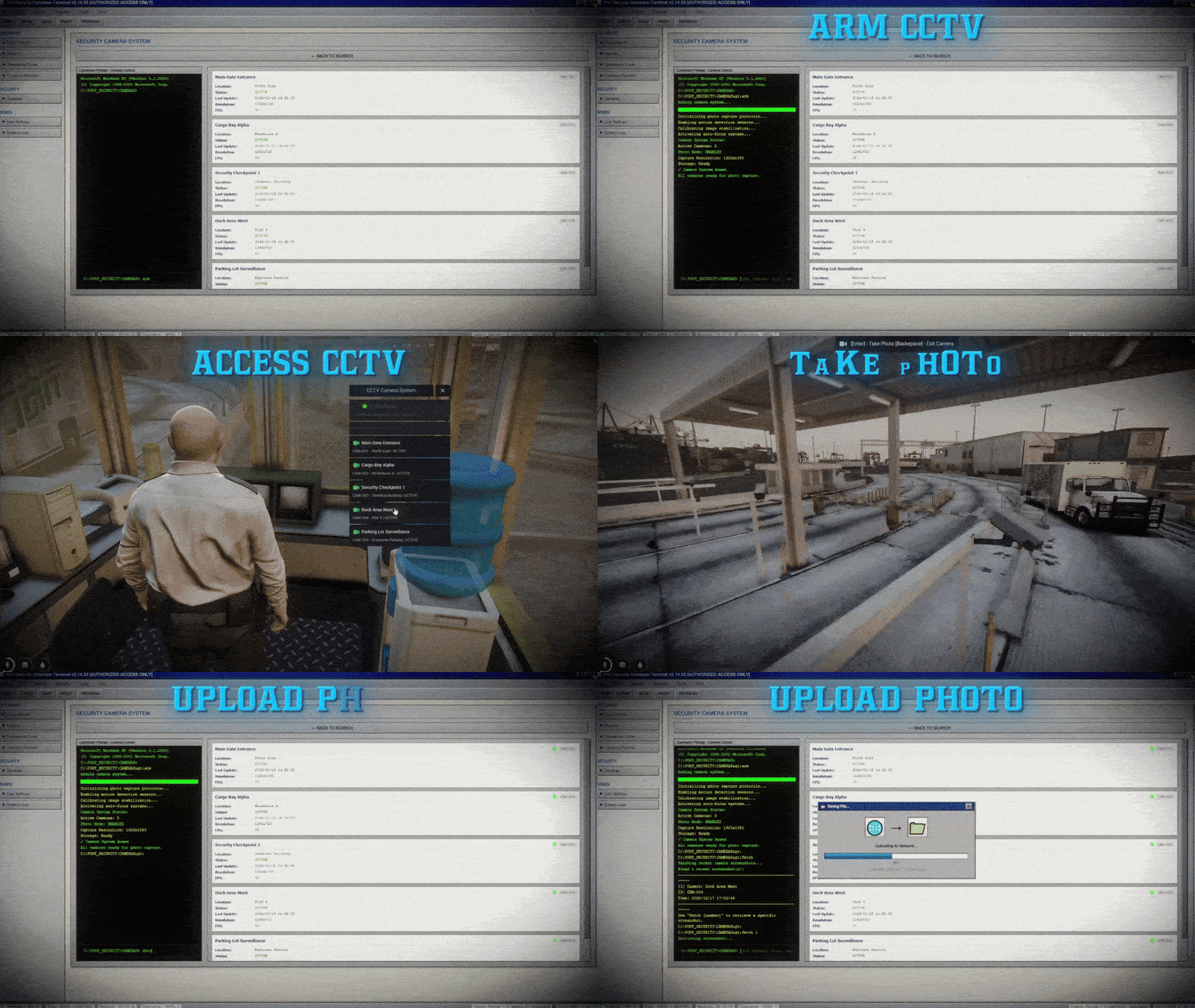
Arm and operate multiple security cameras throughout the port checkpoint. Access cameras via CCTV panel interaction or command prompt. Capture photographs as evidence during inspections. Fetch and attach photos to driver reports using ID number lookup. Features include multiple camera locations, status tracking (ACTIVE/MAINTENANCE/OFFLINE), and automatic photo organization.
Professional surveillance system for evidence collection.
All Photos Automatically Linked to Driver Reports
📊 COMPREHENSIVE REPORTING SYSTEM
Generate detailed inspection reports with complete driver information, verification results, cargo manifest data, and photo evidence. Reports include identity verification status (Pass/Failed), all driver responses, route information, and decision outcomes. View historical reports, search by date, and review complete inspection history through the MDT interface.
Complete audit trail for all security operations.
All Reports Saved to Database with Full History
🚛 VEHICLE PATH SYSTEM
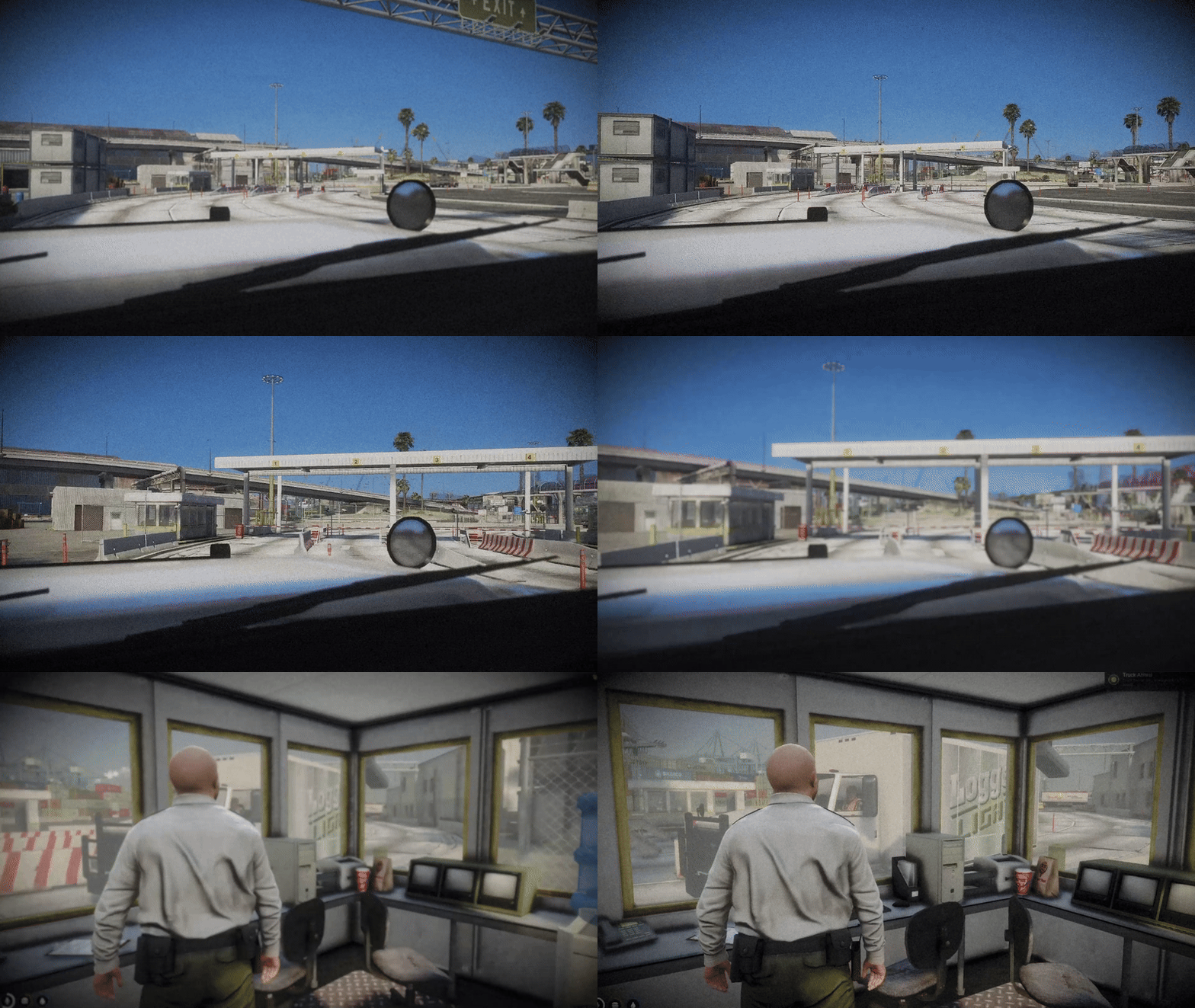
Configure multiple vehicle routes with waypoint systems for realistic truck arrivals. Set speed limits, valid/invalid waypoints, and route variations. Trucks spawn and follow configured paths to the checkpoint, creating dynamic and varied inspection scenarios. Support for multiple routes with different entry points and speeds.
Realistic vehicle movement for immersive checkpoint operations.
All Vehicle Paths Fully Configurable
🏢 COMPANY SYSTEM
Pre-configured company database with valid routes, badge number formats, and company-specific information. Each company has valid "Coming From" and "Going To" locations for route verification. Validate driver credentials against company standards, including badge number prefixes and route compatibility.
Complete company database for credential verification.
All Company Data Configurable in Config.lua
🎭 DRIVER PROFILE VARIANTS
Each driver ped model has multiple profile variants - clean profiles that pass verification and mismatch profiles that fail. System randomly selects profiles when spawning drivers, creating unpredictable inspection scenarios. Profiles include realistic names, ID numbers, badge numbers, expiry dates, and company affiliations.
Dynamic driver profiles for varied roleplay scenarios.
All Profiles Configurable with Multiple Variants
🖥️ OPERATIONAL GUIDE
Built-in operational guide with complete 8-step procedure documentation. Includes validation rules, verification standards, company reference information, and step-by-step instructions for officers. Accessible directly from the MDT interface for quick reference during operations.
Complete documentation system for officer training.
All Procedures Documented in MDT Interface
⚙️ Configuration
🎯 Framework Selection
Choose your framework system - QBCore or ESX supported.
Config.Framework = "qb-core" -- Options: "qb-core" or "esx"
🎯 Target System Configuration
Configure your preferred target system for interactions.
Config.Target = {
    system = "ox_target" -- Options: "ox_target" or "qb-target"
}
🚛 Vehicle Path Configuration
Configure multiple routes with waypoints, speeds, and valid/invalid paths.
Config.VehiclePaths = {
    ["Route1"] = {
        speed = 15.0, -- Speed in MPH
        waypoints = {
            { coords = vector4(855.0878, -3176.4348, 6.0317, 91.9030), flag = "START" },
            { coords = vector4(794.0805, -3163.8945, 5.8527, 44.5151), flag = "STOP" },
        },
        validWaypoints = { ... },
        invalidWaypoints = { ... }
    }
}
📸 Camera System Setup
Configure multiple security cameras with locations, status, and technical specifications.
Config.Cameras = {
    {
        id = "CAM-001",
        name = "Main Gate Entrance",
        location = "North Gate",
        status = "ACTIVE", -- ACTIVE, MAINTENANCE, OFFLINE
        coords = vector4(794.1877, -3168.757, 7.600155, 257.68),
        resolution = "1920x1080",
        fps = 30
    }
}
👤 Driver Profile Configuration
Configure driver profiles with multiple variants per ped model.
Config.DriverProfiles = {
    ["s_m_y_dockwork_01"] = {
        -- Clean profiles (pass verification)
        { name = "Michael Warren", dob = "04/12/1986", idNumber = "LS-42A7-9932", ... },
        -- Mismatch profiles (fail verification)
        { name = "John Smith", dob = "13/03/1980", idNumber = "INVALID-123", ... }
    }
}
🏢 Company & Route Configuration
Configure company information, valid routes, and badge number formats.
Config.Companies = {
    ["PostOP"] = {
        comingFrom = { "San Fierro", "Las Venturas", ... },
        goingTo = { "Mission Row Post Facility", "Pillbox Hospital", ... }
    }
}
📍 Location Configuration
Configure checkpoint locations, computer positions, fax machines, and CCTV panels.
Config.ComputerCoord = vector3(790.6794, -3167.0259, 6.2126)
Config.FaxMachine = vector4(792.7047, -3168.056, 5.980865, 0.0)
Config.CCTVPanel = vector3(792.0309, -3169.021, 6.116768)
━━━━━━━━━━━━━━━━━━━━━━━━━━━━━━━━━━━━━━━
🛠️ Dependencies
Make sure you have all of these installed and properly configured before using the script! ⚡
⚙️ Core Framework ( Choose One )
✅ QB-Core → Required for the script to function
✅ ESX → Required for the script to function
✅ QBOX → Required for the script to function
🗄️ Database
💾 OxMySQL → Handles saving & retrieving data
🧩 UI & Libraries
📚 Ox_Lib → Download
📚 PolyZone → Required for zone management
📸 Screenshot System
📷 screenshot-basic → Required for camera photo capture
🎯 Target System ( Choose One )
🔵 ox_target (Recommended - Default)
🔴 qb-target
━━━━━━━━━━━━━━━━━━━━━━━━━━━━━━━━━━━━━━━
💸 PURCHASE
💰 Price: $40
🛍️ Store: https://jamzscripts.tebex.io/
▶️ Demo Video: https://youtu.be/TCLIKgciS1s
🚀Make your RP server elite today.