
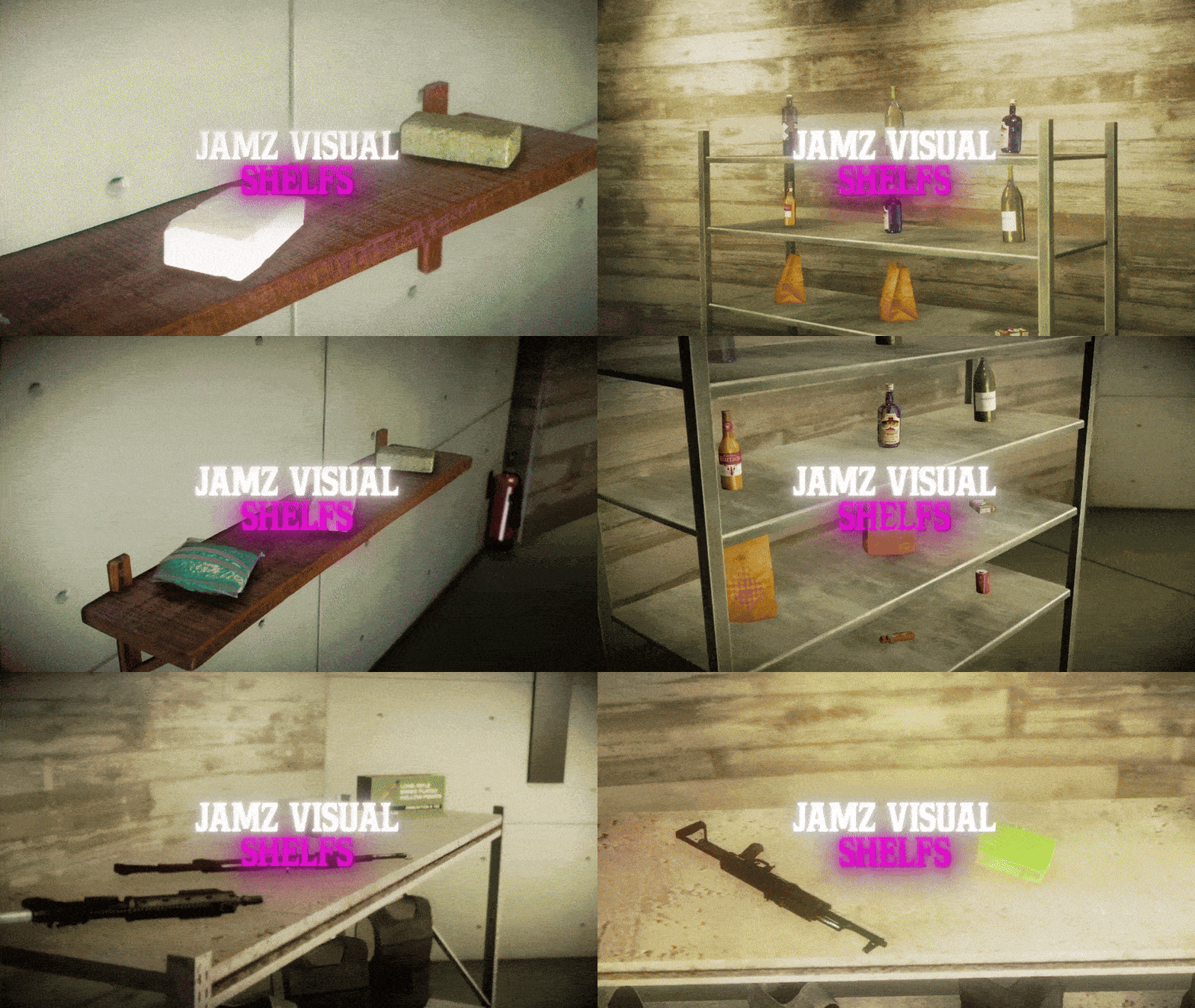
JamzVisualShelfs is a detailed shelf system made for QB-Core servers. 🧠
Players can place shelves anywhere and actually store items on them – everything shows up as 3D props on the shelf itself. 🌍
It’s perfect for RolePlay Servers – whether it’s a job place, a storefront, or just making your spot look more lived-in.
✨ Features
🪑 Placeable & Persistent Shelves
Players can place shelves anywhere — small, medium, large, wall-mounted, wooden bookshelves, and more. All placements are saved using MySQL (Databases) and stay after restarts.
📦 3D Item Display
Items stored in a shelf show up as real 3D props on the shelf. Perfect for shops, stash houses, or just displaying what you’ve got.
🧰 Multiple Shelf Types
Supports a variety of shelf models — each with custom slot layouts to match the design.
✅ Includes 3 CUSTOM SHELF MODELS
🎯 Customizable Display Items
Choose exactly which items show up visually (e.g., weapons, props), and control how they look and rotate.
You can also add your own custom shelf models in the config.
📚 Inventory Support
Fully works with both old and new QB-Inventory systems out of the box.
🔐 Ownership & Security
Only the player who placed a shelf can pick it back up. No randoms stealing your display.
🐛 Debug Mode
Toggle dev logs for testing or troubleshooting.
⚡ Optimized Performance
Runs clean at 0.00ms in resmon.
🛠️ Customization
🪑 Add New Shelf Types
Easily add your own custom shelf models by editing Config.PlaceableProps. Just drop in the item and model name and it’ll work out of the box.
Config.PlaceableProps = {
    ['small_storage_shelf'] = 'prop_shelves_02',
    ['medium_storage_shelf'] = 'prop_shelves_01',
    ['large_storage_shelf'] = 'prop_ff_shelves_01',
    ['wooden_bookshelf'] = 'wooden_bookshelf',
    ['wall_shelf'] = 'wall_shelf',
    ['wall_shelf2'] = 'wall_shelf2',
}
🧰 Control What Gets Displayed
Edit Config.DisplayableItems to define which items get rendered as props (weapons, objects, etc.) and customize their rotation.
(All default QB-Core items are set up out of the box.)
Config.DisplayableItems = {
    ["weapon_dagger"] = {
        prop = "prop_w_me_dagger",
        displayName = "Weapon Dagger",
        rotation = vector3(90.0, 0.0, 0.0)
    },
    /* add more items here */
}
🎯 Adjust Slot Positions
Fine-tune how items show up on each shelf by customizing the display slots for every model — perfect alignment, your way.
["wall_shelf"] = {
    slots = {
        [1] = vector3(-0.7291706, -0.2537088, 0.4416461),
        [2] = vector3(0.0165632, -0.2537088, 0.4416461),
        [3] = vector3(0.7062251, -0.2537088, 0.4416461),
    },
},
🎲 Randomized Spawning
Props spawn with subtle variations in position and rotation, creating a more natural and dynamic placement each time.
Config.NaturalVariation = {
    positionOffset = {
        x = { min = -0.02, max = 0.02 }, /* ±2 cm */
        y = { min = -0.02, max = 0.02 }, /* ±2 cm */
        z = { min = -0.01, max = 0.01 }, /* ±1 cm */
    },
    rotationOffset = {
        x = { min = -5.0, max = 5.0 },   /* ±5 degrees */
        y = { min = -5.0, max = 5.0 },   /* ±5 degrees */
        z = { min = -10.0, max = 10.0 }, /* ±10 degrees */
    },
    applyChance = 0.8, /* 80% chance to apply variation */
    enabled = true,
}
🔧 Dependencies
✅ QB-Core
Main framework. Must be installed and running.
💾 Oxmysql
Used for saving shelf data to your database.
🎒 Inventory Systems — Choose One
Supports multiple inventory systems out of the box:
- ✅ QB-Inventory (Both OLD & NEW versions supported)
- ✅ OX_Inventory
🎯 Target System
You must have either of the following installed:
- 🔵 ox_target
- 🔴 qb-target
🧱 Object_Gizmo
https://github.com/DemiAutomatic/object_gizmo